Setting up AI code review on a GitHub repo
Every pull request to main now gets an automatic review from Claude. This is the setup, written down so I don't have to work it out twice.
Overview
I finished a course on AI code review (AI Code Review, DeepLearning.AI with Qodo) with a clear idea of why it matters and no idea how to set any of it up. This is the setup I ended up with, written down so I don’t have to work it out twice.
The short version: every pull request to main now gets an automatic review from Claude. GitHub Actions runs it, and my Claude Pro plan pays for it. There are five pieces.
| Piece | What it is | Where it lives |
|---|---|---|
| Claude GitHub App | Lets Claude read the repo and post comments | GitHub → Settings → Applications → Installed GitHub Apps |
CLAUDE_CODE_OAUTH_TOKEN |
Subscription token so reviews use the Pro plan | Repo → Settings → Secrets and variables → Actions |
claude-code-review.yml |
Workflow that runs the review on each PR | .github/workflows/ in the repo |
CLAUDE.md |
The project rules the reviewer checks against | Repo root |
/code-review |
Local review in the Claude desktop app before opening a PR | Any desktop session |
To check it worked, I opened a PR with a planted SQL injection. The bot flagged it and quoted the CLAUDE.md rule it broke.
Decisions made
| Question | Options | Chosen | Why |
|---|---|---|---|
| PR reviewer | Qodo Merge (free plan, ~30 reviews/mo) or Claude via GitHub Actions | Claude via GitHub Actions | Uses the Pro plan I already pay for, and reads my CLAUDE.md |
| How to pay for reviews | Subscription token or Claude Console API key | Subscription token | No extra bill; reviews count against Pro usage instead |
| Desktop app or terminal | Desktop app for daily work, terminal only where needed | Both | /install-github-app and claude setup-token aren’t available in the desktop app |
| Test repo | Any code repo with CI | An existing project repo | It already had CI and a backend to plant a bug in |
GitHub Actions is free for public repos; private repos on the free plan get 2,000 Linux minutes a month. A review takes a few minutes, so cost there is negligible.
Setup steps I followed
Repeat these for any new repo. Steps 1–3 are once per computer or account; steps 4–7 are per repo.
-
Install the Claude Code command line on Windows. In PowerShell (no Administrator needed):
irm https://claude.ai/install.ps1 | iexThe desktop app doesn’t include the command line, which is why
claudecame back as “not recognized” the first time I tried it. -
Fix the PATH warning. The installer may say its folder isn’t on your PATH. Either run Claude by its full location:
& "$env:USERPROFILE\.local\bin\claude.exe" setup-tokenor add the folder permanently, then open a new PowerShell window:
[Environment]::SetEnvironmentVariable("Path", [Environment]::GetEnvironmentVariable("Path","User") + ";$env:USERPROFILE\.local\bin", "User") -
Create a subscription token. Run
claude setup-token, log in with your Pro account in the browser, and copy the printed token (it starts withsk-ant-oat). Never paste it into a chat or a file. -
Install the Claude GitHub App at https://github.com/apps/claude/installations/select_target → your account → Only select repositories → your repo → Install. Mine wasn’t installed yet; Claude’s cloud sessions connect to GitHub another way.
-
Save the token as a repo secret. Repo → Settings → Secrets and variables → Actions → New repository secret. Name:
CLAUDE_CODE_OAUTH_TOKEN. Value: the token. -
Add the workflow file. I asked a desktop session in the repo to create
.github/workflows/claude-code-review.ymlon a new branch and open a PR. Contents:name: Claude Code Review on: pull_request: types: [opened, synchronize, ready_for_review, reopened] jobs: review: runs-on: ubuntu-latest permissions: contents: read pull-requests: read issues: read id-token: write steps: - uses: actions/checkout@v6 with: fetch-depth: 1 - uses: anthropics/claude-code-action@v1 with: claude_code_oauth_token: ${{ secrets.CLAUDE_CODE_OAUTH_TOKEN }} plugin_marketplaces: "https://github.com/anthropics/claude-code.git" plugins: "code-review@claude-code-plugins" prompt: "/code-review:code-review --comment ${{ github.repository }}/pull/${{ github.event.pull_request.number }}" claude_args: '--allowedTools "mcp__github_inline_comment__create_inline_comment"' -
Merge the setup PR once its checks are green. On that PR the review check passed in 15 seconds because it skipped a workflow-only change, which is expected.
Testing it
The test passed: the bot caught the planted SQL injection within a few minutes.
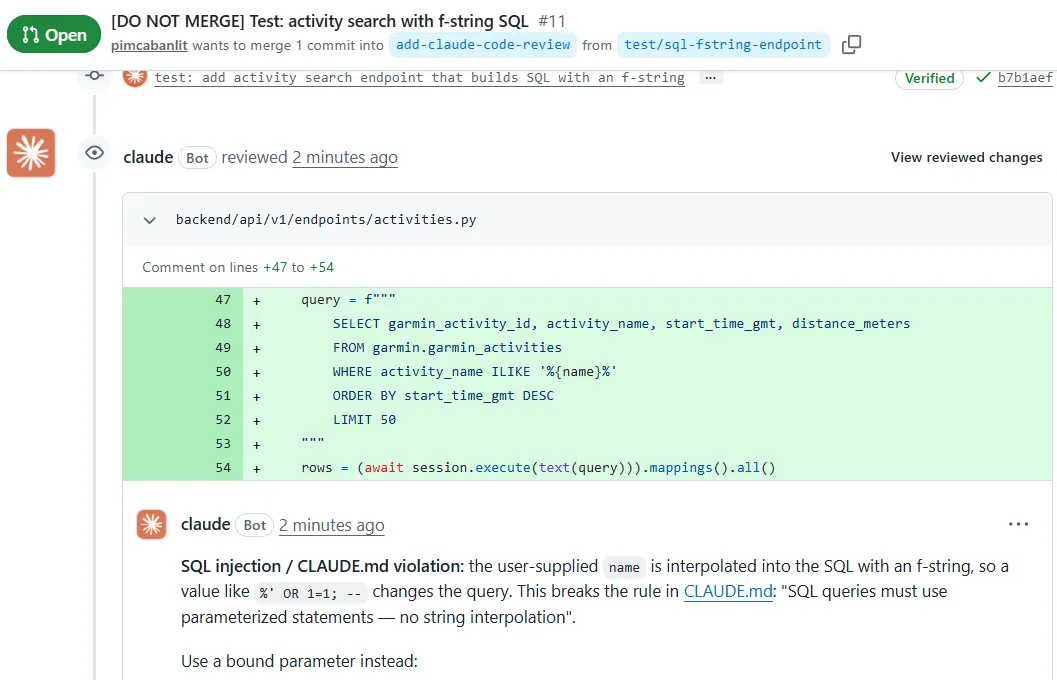
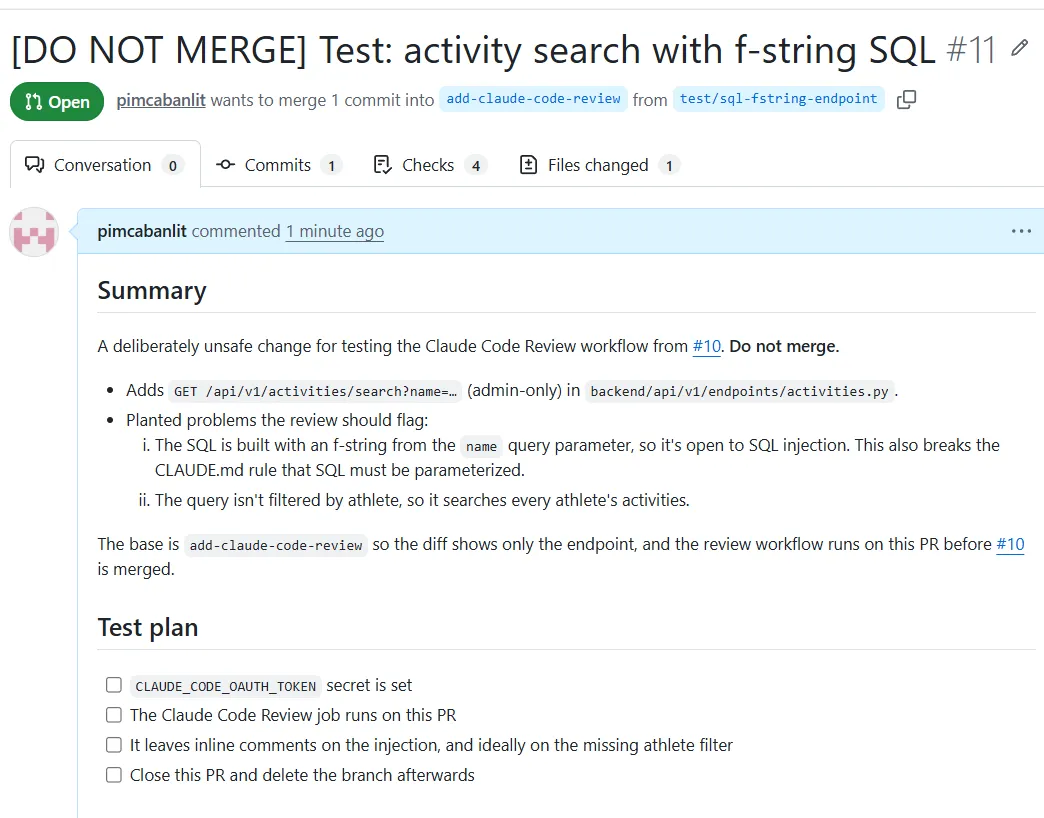
- Plant a bug. I opened a test PR based on the setup branch, so the workflow ran before the setup PR was merged. It added a search endpoint with two problems: SQL built with an f-string, and no filter by the current user.
- Result. The
claudebot left an inline comment on the query: “SQL injection / CLAUDE.md violation”. It showed an attack input (%' OR 1=1; --), quoted the CLAUDE.md rule on parameterized queries, and offered a Suggested change using a bound parameter. - Close the test. Conversation tab → bottom → Close pull request (not Merge) → Delete branch.
- Merge the setup PR. Merge pull request → Confirm merge → Delete branch.
Lessons:
- Don’t describe the planted bugs in the PR body. I did, and it hands the reviewer the answer key.
- The missing user filter is a business rule that isn’t written down anywhere. To catch it reliably, add it to CLAUDE.md: “Every query on user data must filter by the current user.”
How a review works and what it costs
Each review runs nine or more agents in a fixed pipeline. It uses my Pro allowance, the same pool as the desktop app and claude.ai chats: a rolling 5-hour window plus a weekly cap. There is no per-token bill.
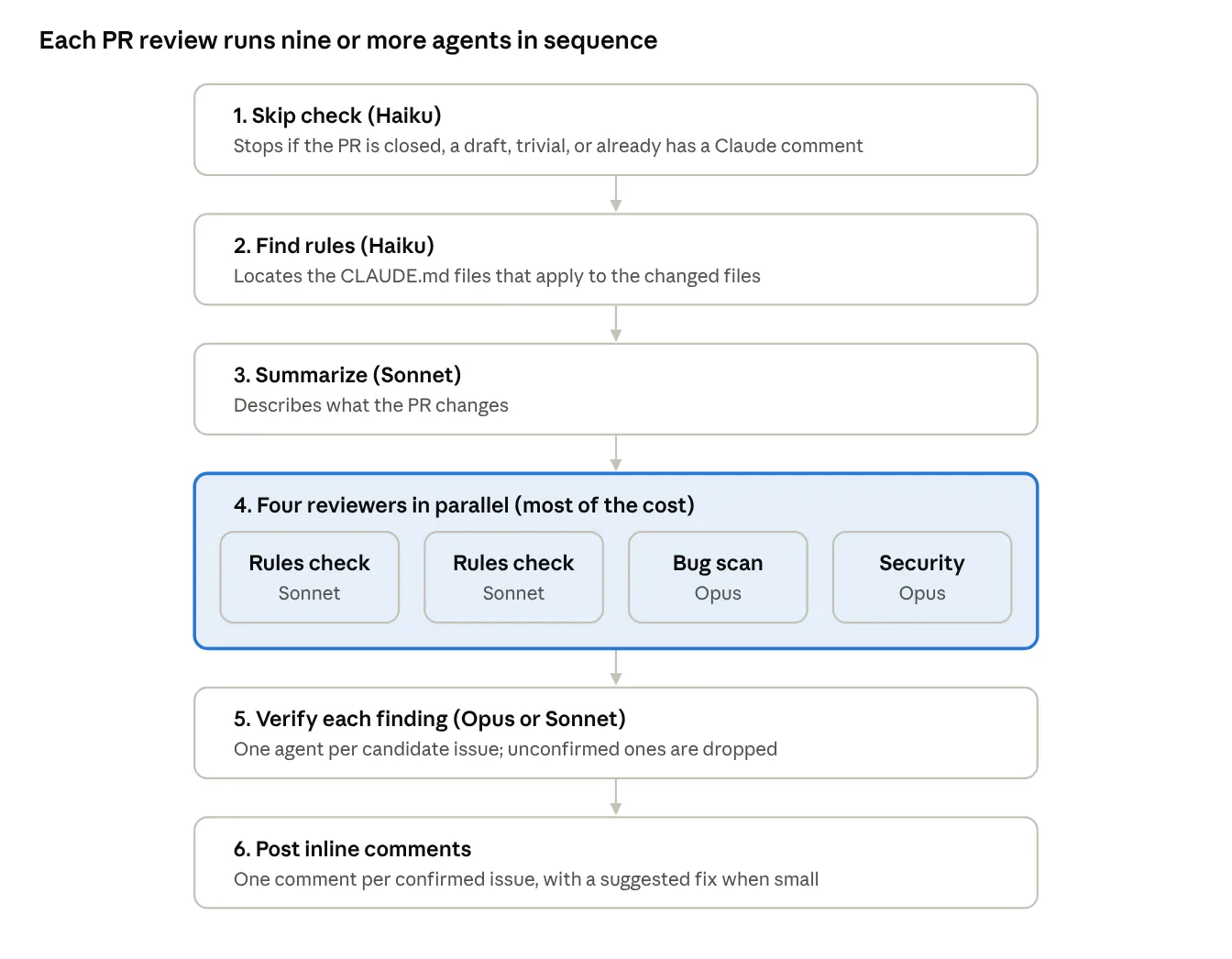
A PR that stops at the skip check costs almost nothing; the four parallel reviewers and the per-finding verifiers are where usage goes.
What raises usage: diff size (read by the summarizer and all four reviewers), CLAUDE.md length (read on every review), number of findings (each starts a verifier), and the Opus agents, which are most of the cost. A skipped PR costs almost nothing.
Catch: the plugin skips a PR that already has a Claude comment, so pushes after the first review aren’t fully re-reviewed. To re-check, close and reopen the PR or run /code-review locally.
Rough size (unmeasured estimate): a few hundred thousand tokens for a small PR, a noticeable share of one 5-hour window.
Where to see real numbers: PR → Checks → Claude Code Review → log (the final summary shows tokens and a dollar-equivalent), and claude.ai → Settings → Usage.
| To cut usage | How |
|---|---|
| Review only on request | Trigger the workflow on a label like needs-review, or drop synchronize |
| Skip docs-only PRs | paths-ignore: ['**/*.md', 'docs/**'] under pull_request: |
| Keep PRs small | One change per PR |
| Keep CLAUDE.md short | Rules only |
| Review locally first | /code-review before the PR means fewer findings to verify |
| Cap runaway jobs | timeout-minutes: 15 on the job |
/code-review in the desktop app vs the GitHub plugin
Use /code-review in the desktop app to clean up my own work before a PR, and let the GitHub plugin act as the strict independent check on the PR.
/code-review in the desktop app |
code-review plugin on GitHub |
|
|---|---|---|
| Runs when | I type it or ask for a review | Automatically on every PR |
| Reviews | Branch commits plus uncommitted changes, or a PR, branch, folder or commit range | The PR diff only |
| Inside | Built into Claude Code, instructions not published | Public pipeline: skip check, rules, summary, 4 reviewers, a verifier per finding |
| Models | My session’s model and effort level | Fixed mix of Haiku, Sonnet and Opus |
| Strictness | I choose low to max, or ultra for a cloud deep review |
High-signal only: real bugs, security, clear CLAUDE.md violations |
| Reads | CLAUDE.md | CLAUDE.md |
| Findings | Code review card with Walk through in diff and Apply fixes | Inline PR comments with Suggested change |
| Fixes code | Yes (--fix or Apply fixes) |
No, comments only |
| Repeat runs | Unlimited | Skips a PR it already commented on |
| Usage | Pro allowance | Pro allowance |
Both are Claude reading the same CLAUDE.md, so they share blind spots. Fill gaps by adding rules, or add Qodo later as a reviewer from a different company. The managed Code Review service (REVIEW.md, Quick/Standard/Deep levels) is Team and Enterprise only, so it doesn’t apply to Pro.
Daily workflow from here
The loop for every task, mapped to the course’s six best practices:
- Write a detailed issue with problem, user story and acceptance criteria (practice 3).
- Build on a branch in the desktop app session.
- Run
/code-reviewbefore pushing, and/security-reviewfor login, payments or user data; fix what matters (practice 2). - Open the PR with
Closes #<issue>in the description so the reviewer sees the requirements. - Read the bot’s comments (practice 1) and sort them by risk: must-fix (security, data, missed requirements, breaking changes), judgment call, or nit (practice 5). Ask follow-up questions on anything unclear.
- Weekly: turn repeat findings into new CLAUDE.md rules (practice 6). CLAUDE.md is the rules file for practice 4.
Still to do:
- Add a Project rules section to CLAUDE.md, including the user-filter rule
- Add
.github/ISSUE_TEMPLATE/task.mdwith acceptance criteria - Optional: switch the workflow to a
needs-reviewlabel trigger to save usage
The reviewer only knows the rules I bother to write down. So, more writing.
Troubleshooting
| Symptom | Cause | Fix |
|---|---|---|
claude is not recognized in PowerShell |
Command line not installed; the desktop app doesn’t include it | irm https://claude.ai/install.ps1 | iex, then open a new window |
| Installer warns folder isn’t on PATH | .local\bin missing from user PATH |
Run by full path, or add it to PATH (setup step 2) |
/install-github-app isn't available in this environment |
Terminal-only command | Do the manual setup (steps 3–6) |
| Review check passes in about 15 seconds with no comments | Skipped as trivial, draft, or already commented | Check the log for “skipping”; open a real code PR |
| Auth or token error in the review log | Secret missing or misnamed | Re-create CLAUDE_CODE_OAUTH_TOKEN exactly |
| No review after new pushes | Plugin skips PRs it has already commented on | Close and reopen the PR, or run /code-review locally |
| Want to remove it all | n/a | Delete the workflow file, delete the secret, uninstall the app in Installed GitHub Apps |